This article is the first part of a three-article series covering the following topics: network, storage, and compute.
What is changing on the network side: the Virtual Private Cloud (VPC)
Following the announcement of the general availability of VMware Cloud Foundation 9.0 on 17 June 2025, and the enhancements brought by VCF 9.1 in May 2026, one component will be a game-changer for network and application teams: the Virtual Private Cloud (VPC).
Until now, connecting a new application to the network under VCF required in-depth mastery of NSX (Tier-0, Tier-1, Edge VM) and involving the network team for every deployment. The VPC changes this mechanism: it introduces pay-as-you-go network consumption, like a public cloud. It is also now directly accessible to application teams from vCenter, not only from the NSX console.
The VPC is an additional tool in the VCF network toolbox, not a replacement. This means that classic VLANs, traditional Tier-0/Tier-1 NSX routing, as well as standard firewall mechanisms (DFW, Gateway Firewall) remain fully available and can coexist with VPCs as needed.
This first part of our series on the new features of VCF 9 focuses on the network (we posted a TL:DR here). The next articles will cover storage, then compute.
What is a VPC?
A Virtual Private Cloud (VPC) is an isolated and multi-tenant network environment, hosted within a larger VCF private cloud.
It allows an application team to set up and manage its own logically isolated network, with IP addressing, routing, and security rules, all without requiring network intervention for every change. This concept will not be lost on the architects already working with public cloud. In fact, it adopts the logic of a VPC that exists among all major cloud providers, and transposes it to a private VCF cloud.
To learn more, check out this VMware blog article.
Two building blocks create the structure of a VPC.
- Subnets: virtual layer 3 (L3) networks of the OSI model, either public or private. A private subnet uses an IP block that is never advertised outside the VPC. A public subnet receives its addresses directly from the external IP pool. At OVHcloud, it is generally blocks of IP addresses.
- Gateways: each VPC has its own gateway that routes packets between its subnets. A Transit Gateway can connect all VPCs within the same project.
A VPC can remain attached to a single management domain, or extend across several via the span if they share the same NSX instance. In version 9.1, a project can have multiple Transit Gateways, regardless of the number of VPCs it groups together. Each VPC connected to a Transit Gateway can also have a connectivity policy (Community, Promiscuous or Isolated) applied to it controlling its exchanges with other VPCs, without you needing to set up a firewall. The sizing limits (number of VPCs, subnets) remain defined by the maximum NSX configuration values documented by VMware.
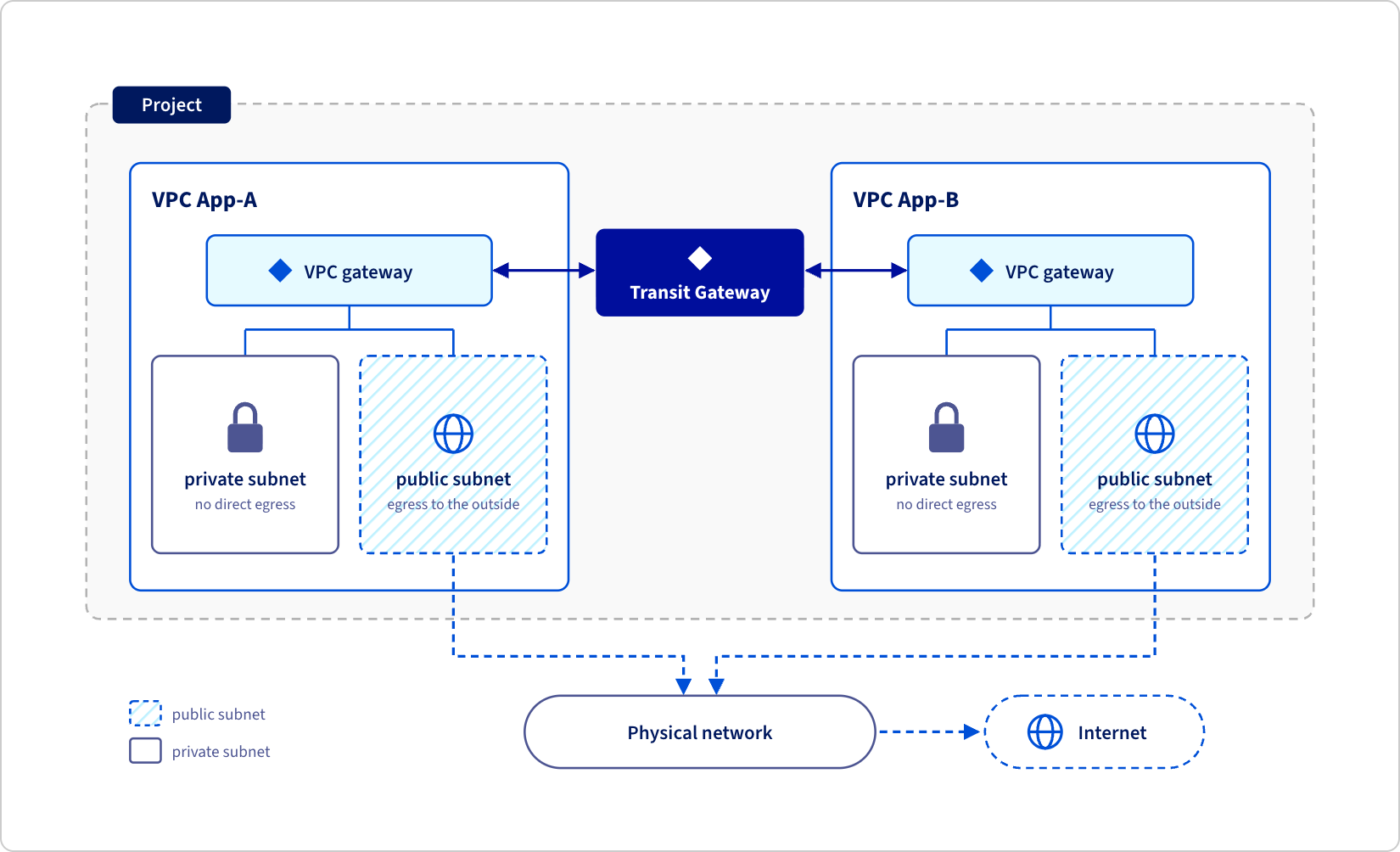
The division of roles remains clear – this is what makes the model truly self-service without sacrificing centralised control. When deploying a management domain, the network administrator sets the IP address blocks that will feed the future VPCs. The vCenter administrators then create the VPCs and their subnets by themselves. They don’t need to choose the IP ranges of public or transit networks: these are taken from predefined blocks. Only the IPs of purely private subnets, which are never announced externally, are freely managed by the application team.
In practice, an application team that needs a new isolated environment can create its own VPC in a few clicks, without opening a ticket with the network team or waiting for a maintenance window.
This way, everything is managed from the vCenter network tab (VPC creation, subnet creation, connectivity configuration) or via the API/PowerCLI, meaning you can integrate the VPC creation directly into Infrastructure as Code pipelines, just like a virtual machine deployment. No need to touch the physical switches or routers – NSX installs and automatically manages the underlying virtual components.
For those of you familiar with the vSphere Client, here is how subnets are represented within a VPC in VCF 9.x.
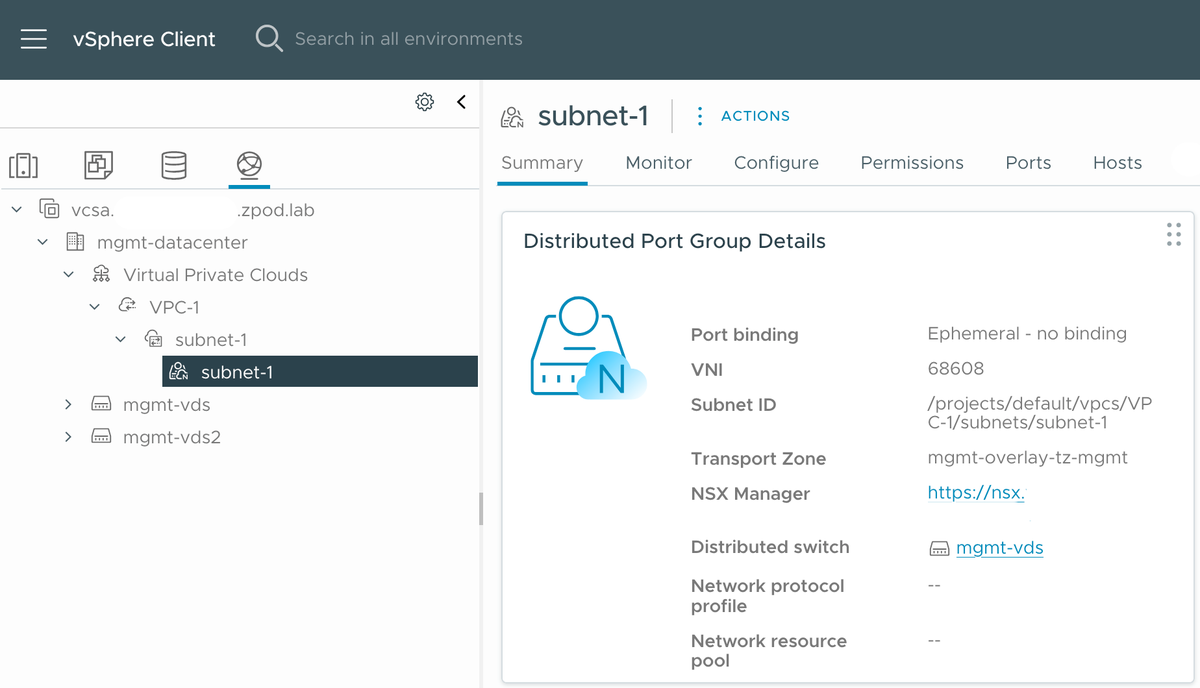
This system is not entirely new: VCF 5.2.1 had already introduced a preview of it in vCenter. VCF 9.0 expands the model. VCF 9.1 will enhance it with new connectivity capabilities, which we’ll cover in the next chapter.
VPC Features and Components
Centralised versus distributed connectivity
A VPC can connect its workloads to the physical network in two ways. In centralised connectivity, the Transit Gateway routes traffic to a Tier-0 gateway instantiated on Edge NSX virtual machines: all incoming and outgoing traffic passes through them. In distributed connectivity, introduced with VCF 9.0, the Transit Gateway directly relies on a VLAN shared by all ESX hosts, without any Edge virtual machine or Tier-0 gateway. VCF 9.1 closes the main historical limitation of this second mode: the absence of advanced network services. The choice between these two modes depends more on the required network service level than on network performance alone.
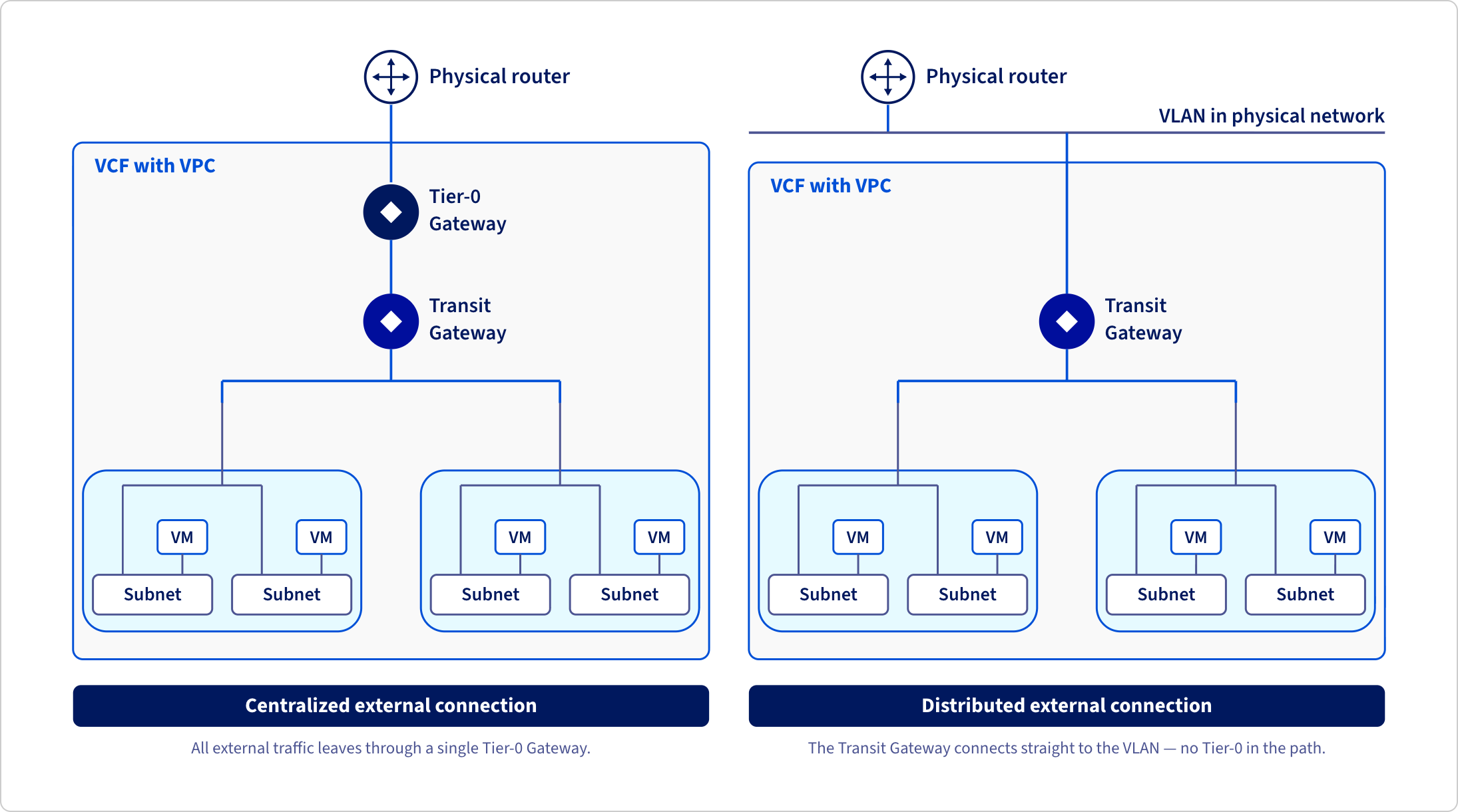
VPC et Distributed Transit Gateway (DTGW)
The distributed model was simple and boosted performance, but remained limited to basic network services (static NAT, distributed DHCP). With VCF 9.1, a new software block fills this gap: the Virtual Network Appliance (VNA). This is a lightweight appliance, deployed from vCenter, which connects to a distributed VPC environment to provide centralised services on demand: Advanced NAT, DHCP and especially load balancing via Avi Load Balancer. The result: a distributed Transit Gateway can now rely on Avi to expose a Load Balancer, without reintroducing a classic Edge virtual machine or giving up the performance gains of the distributed model.
Note: after reading this blog post, be sure to follow our roadmap for the VMware Avi Load Balancer, and feel free to add your comments and/or vote for what we should prioritise.The Avi Load Balancer is the L4-L7 load balancing engine integrated into VCF: up to VCF version 9.1, it was reserved for centralised connectivity deployments because the distributed model had no integration method. The Virtual Network Appliance (VNA) fills this gap: a network administrator deploys it once at the project or VPC level, then links it with the Avi controller. The application teams can then create their own Avi Virtual Services to expose an API, a website, or a Kubernetes ingress, without ever touching the underlying network configuration. This combination makes the distributed model viable for almost all application use cases, when it previously only covered the simplest scenarios.
Distributed VLAN connection for vSphere Supervisor
The VNA also opens up distributed connectivity to new use cases: vSphere Supervisor and VCF Automation can now connect to the datacentre through a simple VLAN, rather than a heavier centralised connectivity architecture. For teams deploying Kubernetes (vSphere Supervisor) or orchestrating application environments (VCF Automation), this significantly reduces the network prerequisites that need to be set up beforehand – you no longer need to prepare a dedicated Edge/Tier-0 topology to get functional connectivity.
To sum up...
The Virtual Private Cloud transforms how network and application teams collaborate under VCF 9. This means fewer round trips, self-service network consumption, and now, thanks to VNA, advanced services (Avi Load Balancer, simplified VLAN connectivity for Supervisor) that are accessible without sacrificing the simplicity of the distributed model.
For architects, the message is simple: fewer tickets exchanged with the network team and an infrastructure that remains under control thanks to quotas defined upstream. This development is part of a broader VCF 9 trend: bringing the private cloud closer to a public cloud experience, without giving up control of the infrastructure.
The next part of this series will focus on new storage innovations.
Discover VMware Cloud Foundation at OVHcloud and start building your private cloud.