Every managed database you use starts its life as a Docker image. Think of it as a furnished flat: Debian for the walls, the database engine for the furniture, and a few OVHcloud helpers for the plumbing. You move in, we keep the flat in good order.
The tricky part? The furniture keeps changing. MariaDB, MySQL (Percona Server), PostgreSQL, and Valkey ship new versions all year long, and each one brings bug fixes, security patches and, sometimes, surprises.
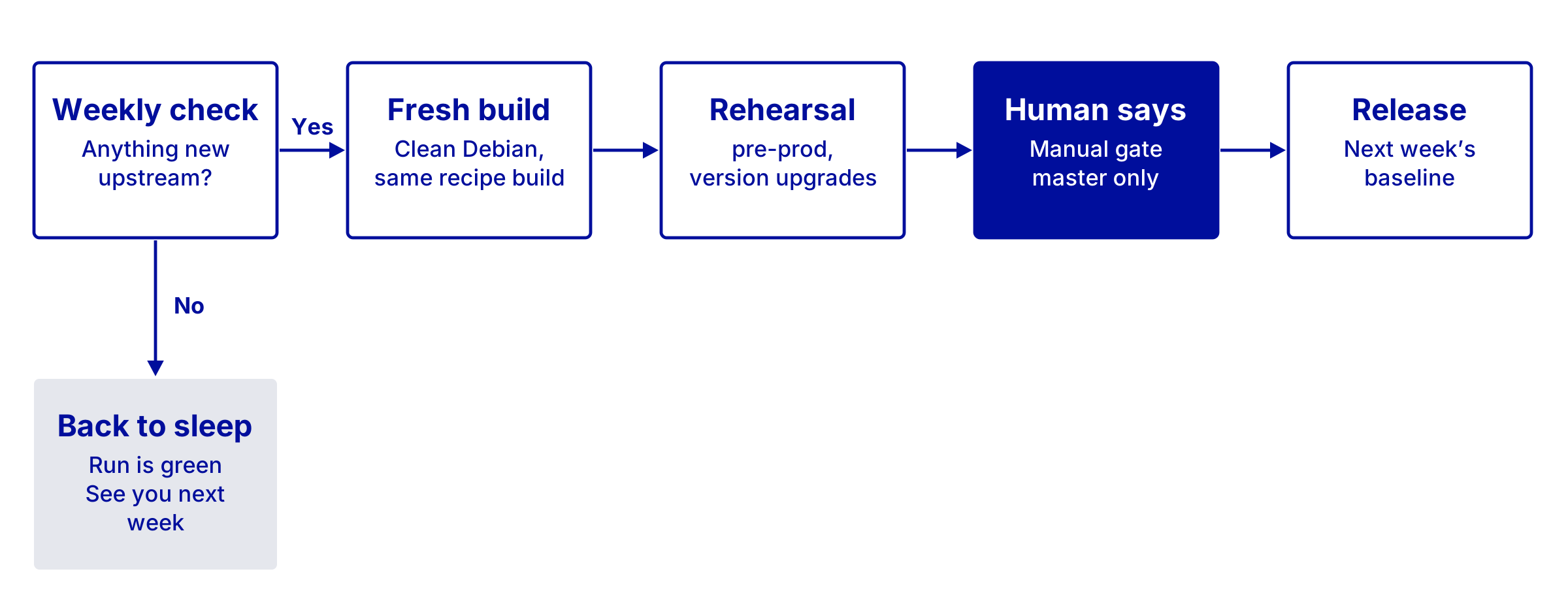
So we built Emile, a factory that keeps database images up to date. Every week, it checks 15 engine/version pairs, rebuilds whatever needs rebuilding, rehearses it, and waits for a human to say yes. Here is a week in its life.
Anything new this week?
Every week, each engine/version pair has its own slot in CDS, our open-source CI/CD platform. All 15 workflows share a single template, and each one only carries a cron line and six parameters (engine, version, Debian release, and so on).
The first job, version, asks one question: is the newest upstream package already in production?
- It asks the vendor’s apt repository for the newest candidate package. Valkey, being compiled from source, asks GitHub instead.
- It turns that into an image tag: the package version, plus the Debian point release it will be built on.
- It looks for that tag in our production registry.
Tag found? Nothing to do. The job goes back to sleep, and the run ends green. Most weeks, this is the whole story, and that is exactly what we want. The cheapest build is the one you skip, and nothing is rebuilt for the sake of it.
Tag missing? Then the build starts.
Building from scratch
We never patch an old image. Every build starts from a clean Debian image and follows the same written recipe. That recipe has two layers.
Packer defines the outside of the image. A single template builds every engine: it starts a Debian container, provisions it, then commits it with the same entrypoint, healthcheck, and labels everywhere. The only per-engine settings are the exposed ports and volumes.
Ansible fills it. A base role sets up what every image shares: locales, timezone, supervisord as the container’s init… Then the engine role takes over (mariadb, percona, postgresql, or valkey). Each one follows the same steps:
- add the vendor’s repository and signing key;
- install the engine;
- configure it, and drop in the start-up script and the healthcheck.
Supporting a new major version mostly means adding one variables file and a weekly workflow. The recipe stays the same, which is the whole point.
The rehearsal
A fresh image lands in a snapshot registry, not in production. This snapshot goes on stage in pre-production, like a dress rehearsal before opening night.
We do not only check that it starts. We also rehearse the journeys real instances take: moving from the version that runs today to the new one, and moving between major versions of the same database. If any of that goes wrong, the new image stays backstage.
A human says yes
As we like to say, a good sysadmin is a sysadmin doing nothing, so machines do almost all the work. Almost. The release job sits behind a manual gate that only opens on the master branch. A member of the team presses the button, and the image is promoted from snapshot to release.
Then machines take over the painful work again: every day, 5% of our production fleet is moved to the new image. The order is randomised across customers, so there is no pattern to when a given instance moves.
That promoted image also becomes next week’s baseline, the tag the version job will look for. The loop is closed.
When things go off-script
Automation is easy when the world behaves. Here is what happens when it does not:
A default setting changes quietly: Each engine role keeps a copy of the vendor’s pristine default config, as reviewed by us. After installing, the build compares the two. Any difference, and the build fails on purpose. A human reads the diff, checks and ports what matters into our config, updates the reference, and the factory starts again. No surprise reaches production unread.
A tag is not a release: Valkey sometimes pushes a git tag before the release is actually published. So Emile only trusts a version once its release notes mention it. No release notes, no build.
GitHub says “slow down”: We first listed Valkey versions through GitHub’s REST API. Anonymous callers get 60 requests an hour per IP, and our CI workers share one route out to the internet. Manual operations ran into that limit three times in one week. The automated weekly process was not the cause, but we adapted it anyway. The API also returns only 30 releases per page by default, which is a bit short to cover every release from Valkey 7.2 up to the latest. We now read the tags with git ls-remote, which avoids both problems in our setup.
A homemade fix is required: No new database version, but the plumbing needs fixing. When the weekly check finds nothing new, the build job is skipped but stays startable by hand. One click rebuilds the image on the patched base, and it still goes through the same rehearsal and the same human approval.
Databases up to date: what it means for you
Emile’s secret is not a clever tool. It is a cheap question asked every week, automated for our workload’s sake.
For you, that means:
- up to date without the chores: we check for new versions every week, and minor upgrades are applied automatically.
- built fresh every time: a clean system and the same recipe, with no leftovers from the past.
- rehearsed before it ships: upgrades between versions are tested in pre-production first.
- signed off by a person: nothing goes live just because a script finished.
Figures for this use case? 15 weekly workflows, five different engines (the four above plus sharedsql, the databases provided with our hosting plans), one Packer template, and one human needed to press “release”.
Want your databases kept up to date for you? Explore Web Cloud Databases.