
If you want to have more information on AI Endpoints, please read the following blog post. You can, also, have a look at our previous blog posts on how use AI Endpoints.
You can find the full code example in the GitHub repository.
In this article, we will explore how to perform OCR (Optical Character Recognition) on images using a vision-capable LLM, the OpenAI Python library, and OVHcloud AI Endpoints.
Introduction to OCR with Vision Models
Optical Character Recognition has been around for decades, but traditional OCR engines often struggle with complex layouts, handwritten text, or noisy images. Vision-capable Large Language Models bring a new approach: instead of relying on specialized OCR pipelines, you can simply send an image to a model that understands both visual and textual content.
In this example, we use the OpenAI Python library to create a simple OCR script powered by a vision model hosted on OVHcloud AI Endpoints.
The whole application is a single Python file: no complex setup, just pip install openai and you’re ready to go.
Setting up the Environment Variables
Before running the script, you need to set the following environment variables:
export OVH_AI_ENDPOINTS_ACCESS_TOKEN="your-access-token"
export OVH_AI_ENDPOINTS_MODEL_URL="https://your-model-url"
export OVH_AI_ENDPOINTS_VLLM_MODEL="your-vision-model-name"
You can find how to create your access token, model URL, and model name in the AI Endpoints catalog. Make sure to choose a vision-capable model from the AI Endpoints catalog.
Installing Dependencies
The only dependency is the OpenAI Python library:
pip install openaiDefine the System Prompt
The first step is to define a system prompt that describes what our OCR service does. This prompt tells the model how to behave:
SYSTEM_PROMPT = """You are an expert OCR engine.
Extract every piece of text visible in the provided image.
Preserve the original layout as faithfully as possible (line breaks, columns, tables).
Do NOT interpret, summarise, or translate the content.
Use markdown formatting to represent the layout (e.g. tables, lists).
If the image contains no text, reply with: "No text found."
"""
We tell it to behave as an expert OCR engine, to preserve the original layout, and to use markdown formatting for structured content like tables or lists.
Load the Image
Before sending the image to the model, we need to encode it as a base64 string. Here is a simple helper function that reads a local PNG file and returns a base64-encoded string:
import base64
from pathlib import Path

def load_image_as_base64(path: Path) -> str:
    """Load a local image and encode it as base64."""
    with open(path, "rb") as f:
        return base64.b64encode(f.read()).decode("utf-8")
The base64-encoded data is what gets sent to the vision model as part of the prompt.
Extract Text from the Image
The extract_text function sends the image to the vision model and returns the extracted text:
def extract_text(client: OpenAI, image_base64: str, model: str) -> str:
    """Extract text from an image using the vision model."""
    response = client.chat.completions.create(
        model=model,
        temperature=0.0,
        messages=[
            {"role": "system", "content": SYSTEM_PROMPT},
            {
                "role": "user",
                "content": [
                    {
                        "type": "image_url",
                        "image_url": {
                            "url": f"data:image/png;base64,{image_base64}"
                        }
                    }
                ]
            }
        ]
    )
    return response.choices[0].message.content
The image is passed as a data URL inside the image_url field, following the OpenAI Vision API format. The temperature is set to 0.0 because we want deterministic, faithful text extraction and not creative output.
Configure the Client
This example uses a vision-capable model hosted on OVHcloud AI Endpoints. Since AI Endpoints exposes an OpenAI-compatible API, we use the OpenAI client and just point it to the OVHcloud endpoint:
import os
from openai import OpenAI

client = OpenAI(
    api_key=os.getenv("OVH_AI_ENDPOINTS_ACCESS_TOKEN"),
    base_url=os.getenv("OVH_AI_ENDPOINTS_MODEL_URL"),
)

model_name = os.getenv("OVH_AI_ENDPOINTS_VLLM_MODEL")
A few things to note:
- The API key, base URL, and model name are read from environment variables.
- The OpenAI library is compatible with any OpenAI compatible API, making it perfect for use with AI Endpoints.
Assemble and Run
With the client configured, extracting text from an image is straightforward:
image_base64 = load_image_as_base64(Path("./doc.png"))
result = extract_text(client, image_base64, model_name)
print(result)
And that’s it!
Here is the image used for this example:
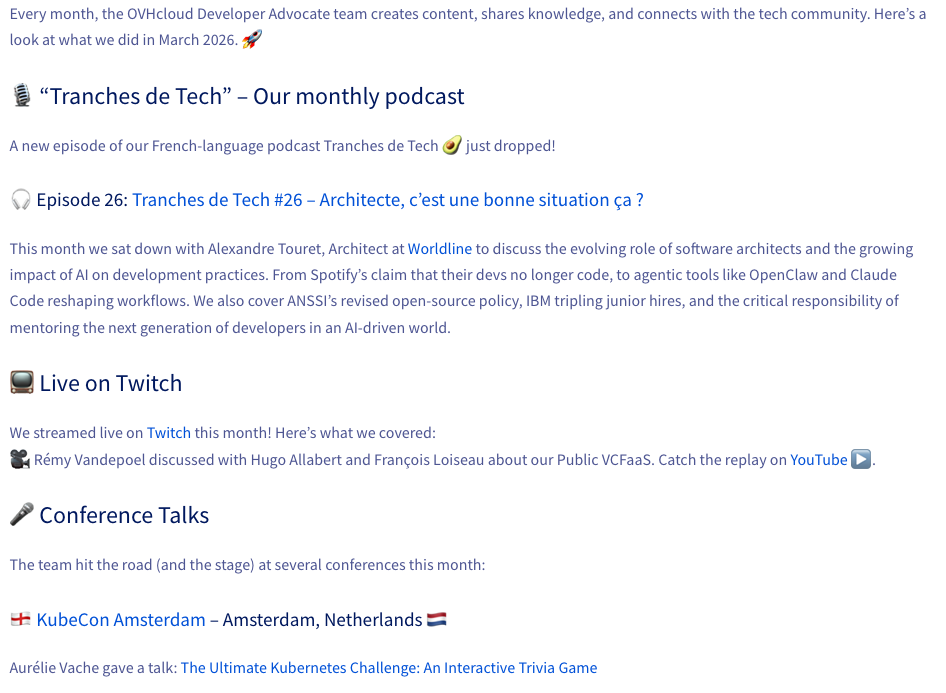
And the result:
$ python ocr_demo.py
📄 Loading image: doc.png
🔍 Running OCR with Qwen2.5-VL-72B-Instruct via OVHcloud AI Endpoints...

📝 Extracted text 📝
Every month, the OVHcloud Developer Advocate team creates content, shares knowledge, and connects with the tech community. Here’s a look at what we did in March 2026. 🚀

🎙️ “Tranches de Tech” – Our monthly podcast

A new episode of our French-language podcast Tranches de Tech🥑 just dropped!

🎧 Episode 102: Tranches de Tech #26 – Architecte, c’est une bonne situation ça ?

This month we sat down with Alexandre Touret, Architect at Worldline to discuss the evolving role of software architects and the growing impact of AI on development practices. From Spotify’s claim that their devs no longer code, to agentic tools like OpenClaw and Claude Code reshaping workflows. We also cover ANSSI’s revised open-source policy, IBM tripling junior hires, and the critical responsibility of mentoring the next generation of developers in an AI-driven world.

📺 Live on Twitch

We streamed live on Twitch this month! Here’s what we covered:

🎥 Rémy Vandepoel discussed with Hugo Allabert and François Loiseau about our Public VCFaaS. Catch the replay on YouTube ▶️.

🎤 Conference Talks

The team hit the road (and the stage) at several conferences this month:

🇳🇱 KubeCon Amsterdam – Amsterdam, Netherlands 🇳🇱

Aurélie Vache gave a talk: The Ultimate Kubernetes Challenge: An Interactive Trivia Game
Conclusion
In this article, we have seen how to use a vision-capable LLM to perform OCR on images using the OpenAI Python library and OVHcloud AI Endpoints. The OpenAI library makes it very easy to send images to a vision model and extract text, and Python allows us to run the whole thing as a simple script.
You have a dedicated Discord channel (#ai-endpoints) on our Discord server (https://discord.gg/ovhcloud), see you there!
Once a developer, always a developer!
Java developer for many years, I have the joy of knowing JDK 1.1, JEE, Struts, ... and now Spring, Quarkus, (core, boot, batch), Angular, Groovy, Golang, ...
For more than ten years I was a Software Architect, a job that allowed me to face many problems inherent to the complex information systems in large groups.
I also had other lives, notably in automation and delivery with the implementation of CI/CD chains based on Jenkins pipelines.
I particularly like sharing and relationships with developers and I became a Developer Relation at OVHcloud.
This new adventure allows me to continue to use technologies that I like such as Kubernetes or AI for example but also to continue to learn and discover a lot of new things.
All the while keeping in mind one of my main motivations as a Developer Relation: making developers happy.
Always sharing, I am the co-creator of the TADx Meetup in Tours, allowing discovery and sharing around different tech topics.