Moving Beyond Ingress: Why should OVHcloud Managed Kubernetes Service (MKS) users start looking at the Gateway API?
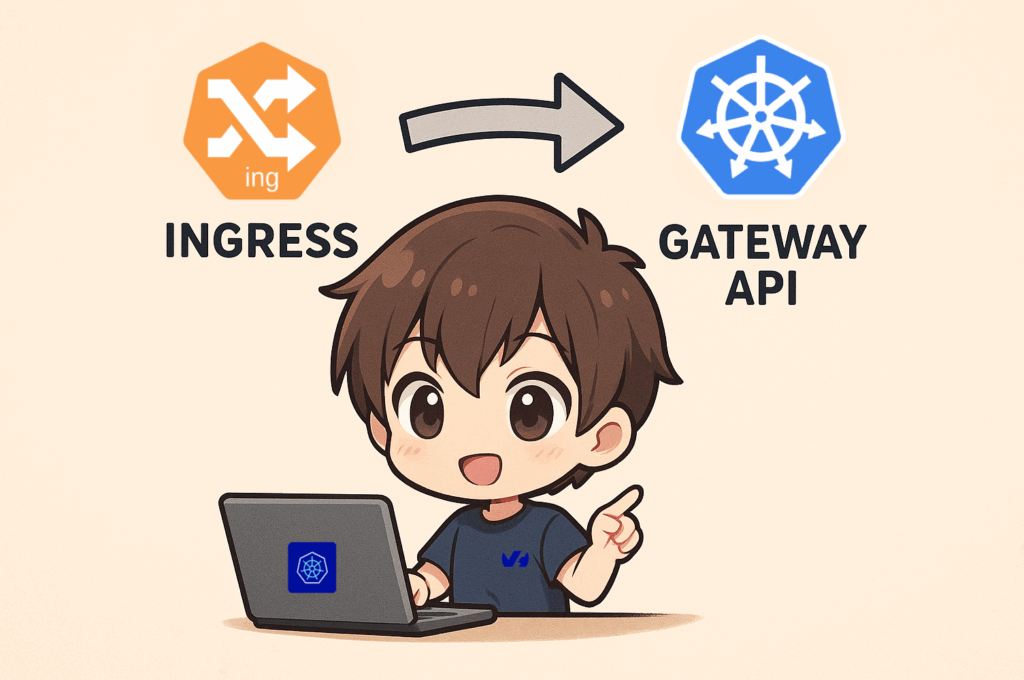
For years, the Kubernetes Ingress API, and the popular Ingress NGINX controller (ingress-nginx), have been the default way to expose applications running inside a Kubernetes cluster.
But the ecosystem is changing: the Kubernetes SIG network has announced the retirement of Ingress NGINX in March 2026.
After March 2026 the Ingress NGINX will no longer get new features, new releases, security patches and bug fixes.
Furthermore, the Kubernetes project recommends using Gateway instead of Ingress.
The Ingress API has already been frozen, which means it is no longer being developed, and will have no further changes or updates made to it. The Kubernetes project has no plans to remove Ingress from Kubernetes.
While OVHcloud Managed Kubernetes Service (MKS) does not yet provide a native GatewayClass, you can already benefit from Gateway API capabilities today by deploying your own controller 💪 .
Also, until Gateway API becomes fully integrated with OpenStack providers, there is an intermediate option: using a modern, actively maintained Ingress controller other than ingress-nginx.
The limitations of the current Ingress controller model
The traditional Kubernetes Ingress model was intentionally simple: define an Ingress, install an Ingress Controller, and let it configure a single proxy (usually Nginx) to route traffic.
This design works, but it comes with limitations:
- Single Monolithic “Entry Point”: All HTTP routing for the entire cluster goes through one shared proxy. It adds complexity, configuration conflicts and scaling challenges.
- Protocol limitations: only HTTP and HTTPS.Support for gRPC, HTTP/2, TCP, UDP or TLS passthrough is inconsistent and controller-specific.
- Heavy Reliance on Annotations: Advanced features (timeouts, rewrites, header handling…) rely on custom annotations.
- Strong 3rd parties and cloud Load Balancers support: Every Ingress controllers (3rd parties providers) come with their specialized annotations.
Finally, as mentioned, the most used Ingress controller, Ingress NGINX, will be retired in March 2026.
A Transitional Solution: Using a Modern Ingress Controller (Traefik, Contour, HAProxy…)
Before moving to the Gateway API, as a transitional solution, OVHcloud MKS users can simply replace Ingress Nginx with a modern, actively maintained Ingress controller.
This allows you to:
- keep using your existing Ingress manifests
- keep the same architecture: Service type LoadBalancer → OVHcloud Public Cloud Load Balancer → Ingress Controller
- avoid relying on unsupported or deprecated components
- gain features (better gRPC support, built‑in dashboards, improved L7 behaviour...)
Popular alternatives:
Traefik:
- Very easy to deploy
- Excellent support for HTTP/2, gRPC, WebSockets
- Built‑in dashboard
- Supports both Ingress and Gateway API
- Actively maintained
- Seamless migration from NGINX Ingress Controller to Traefik with NGINX annotation compatibility
Contour (Envoy):
- Envoy-based Ingress Controller
- Excellent performance
- Good stepping‑stone toward Gateway API
HAProxy Ingress:
- Extremely performant
- Enterprise-grade L7 routing
- Optional Gateway API support
NGINX Gateway Fabric (NGF):
- The successor to Ingress NGINX
- Built directly around Gateway API
- Still maturing but a strong long‑term candidate
If you are interested, you can read the more exhaustive list of Ingress controllers.
Installing an Alternative Ingress Controller on OVHcloud MKS
We will show you how to install Traefik, as an alternative Ingress controller and use it to spawn a single OVHcloud Public Cloud Load Balancer (based on OpenStack Octavia).
Install Traefik:
helm repo add traefik https://traefik.github.io/charts
helm repo update

helm install traefik traefik/traefik --namespace traefik --create-namespace --set service.type=LoadBalancer
This automatically triggers:
- the OpenStack CCM (used by OVHcloud)
- the creation of an OVHcloud Public Cloud Load Balancer
- exposure of Traefik through a public IP

After several seconds, the Load Balancer will be active.
Check that Traefik is running:
$ kubectl get all -n traefik
NAME                           READY   STATUS    RESTARTS   AGE
pod/traefik-6777c5db85-pddd6   1/1     Running   0          31s

NAME              TYPE           CLUSTER-IP     EXTERNAL-IP   PORT(S)                      AGE
service/traefik   LoadBalancer   10.3.129.188   <pending>     80:30267/TCP,443:30417/TCP   31s

NAME                      READY   UP-TO-DATE   AVAILABLE   AGE
deployment.apps/traefik   1/1     1            1           31s

NAME                                 DESIRED   CURRENT   READY   AGE
replicaset.apps/traefik-6777c5db85   1         1         1       31s
Then in order to use it, create an ingress.yaml file with the following content:
apiVersion: networking.k8s.io/v1
kind: Ingress
metadata:
  name: my-app-ingress
  namespace: default
  annotations:
    kubernetes.io/ingress.class: "traefik"  # Specifies Traefik as the ingress controller
spec:
  rules:
    - host: my-app.local
      http:
        paths:
          - path: /
            pathType: Prefix
            backend:
              service:
                name: my-app-service
                port:
                  number: 80
And apply it in your cluster:
kubectl apply -f ingress.yamlUsing this type of alternative provides a fully supported, modern Ingress Controller while you prepare a long‑term transition to the Gateway API.
Gateway API: A modern, flexible networking model
The Gateway API is the next-generation Kubernetes networking specification. It introduces clearer roles and more flexible architectures.
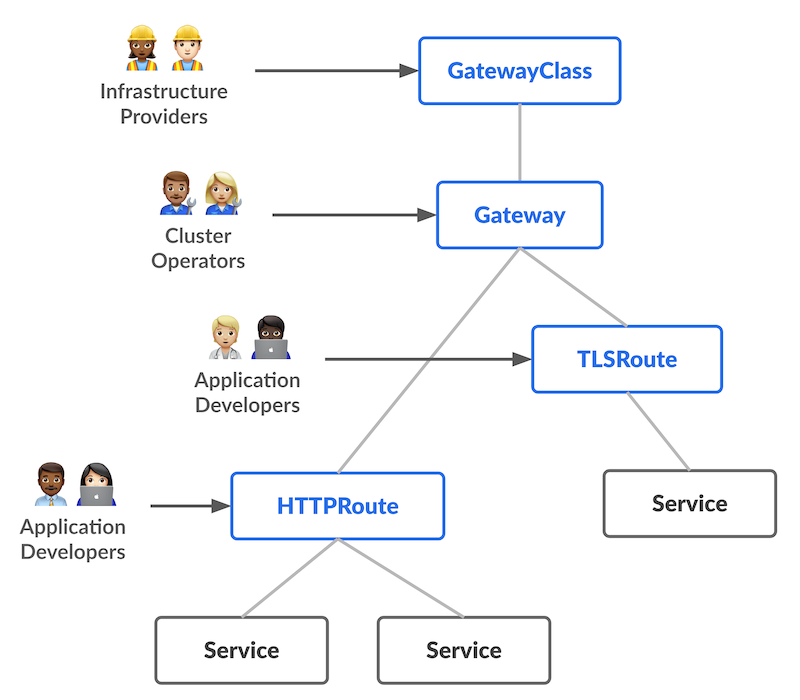
Gateway API splits responsibilities across:
- GatewayClass: defines the type of gateway and which controller manages it
- Gateway: the actual entry point (e.g., a Load Balancer)
- Routes: routing rules, protocol-specific (HTTPRoute, TLSRoute, GRPCRoute, TCPRoute…)
Gateway API supports:
- HTTP(S)
- HTTP/2
- gRPC
- TCP
- TLS passthrough
…in a consistent and portable way.
Unlike Ingress, Gateway API is explicitly designed to allow providers like OVHcloud, AWS, GCP, Azure to:
- provision Load Balancers (LB)
- manage listeners
- expose multiple ports
- integrate with their LB features
This paves the way for native OVHcloud GatewayClass support.
How does it work today on OVHcloud MKS?
OVHcloud MKS relies on the OpenStack Cloud Controller Manager (CCM) to provision OVHcloud Public Cloud Load Balancers in response to a Service of type LoadBalancer.
Since MKS does not yet include a native GatewayClass, you can use Gateway API today as follows:
1. You deploy an existing Gateway Controller (Envoy Gateway, Traefik, Contour/Envoy…) and its GatewayClass.
2. The controller deploys a Data Plane proxy inside the cluster.
3. To expose that proxy, you still have to create a Service of type LoadBalancer (and your app of course).
4. The CCM provisions an OVHcloud Public Cloud Load Balancer and forwards traffic to your proxy.
Thanks to that, you will have a fully functional Gateway API. The workflow is very similar to that which is required for using NGINX Ingress controller.
Using the Gateway API on OVHcloud MKS today
You can already use the Gateway API by deploying your preferred controller.
Here’s an example using Envoy Gateway, one of the most future-proof options.
Deploy Envoy Gateway:
helm install eg oci://docker.io/envoyproxy/gateway-helm -n envoy-gateway-system --create-namespaceYou should have a result like this:
$ helm install eg oci://docker.io/envoyproxy/gateway-helm -n envoy-gateway-system --create-namespace

Pulled: docker.io/envoyproxy/gateway-helm:1.6.0
Digest: sha256:5c55e7844ae8cff3152ca00330234ef61b1f9fa3d466f50db2c63a279f1cd1df
NAME: eg
LAST DEPLOYED: Mon Dec  1 16:27:07 2025
NAMESPACE: envoy-gateway-system
STATUS: deployed
REVISION: 1
TEST SUITE: None
NOTES:
**************************************************************************
*** PLEASE BE PATIENT: Envoy Gateway may take a few minutes to install ***
**************************************************************************

Envoy Gateway is an open source project for managing Envoy Proxy as a standalone or Kubernetes-based application gateway.

Thank you for installing Envoy Gateway! 🎉

Your release is named: eg. 🎉

Your release is in namespace: envoy-gateway-system. 🎉

To learn more about the release, try:

  $ helm status eg -n envoy-gateway-system
  $ helm get all eg -n envoy-gateway-system

To have a quickstart of Envoy Gateway, please refer to https://gateway.envoyproxy.io/latest/tasks/quickstart.

To get more details, please visit https://gateway.envoyproxy.io and https://github.com/envoyproxy/gateway.
Check the Envoy gateway is running:
$ kubectl get po -n envoy-gateway-system
NAME                            READY   STATUS    RESTARTS   AGE
envoy-gateway-9cbbc577c-5h5qw   1/1     Running   0          16m
As a quickstart, you can install directly the GatewayClass, Gateway, HTTPRoute and an example app:
kubectl apply -f https://github.com/envoyproxy/gateway/releases/download/latest/quickstart.yaml -n defaultThis command deploys a GatewayClass, a Gateway, a HTTPRoute and an app deployed in a deployment and exposed through a service:
gatewayclass.gateway.networking.k8s.io/eg created
gateway.gateway.networking.k8s.io/eg created
serviceaccount/backend created
service/backend created
deployment.apps/backend created
httproute.gateway.networking.k8s.io/backend created
As you can see, a GatewayClass have been deployed:
$ kubectl get gatewayclass -o yaml | kubectl neat
apiVersion: v1
items:
- apiVersion: gateway.networking.k8s.io/v1
  kind: GatewayClass
  metadata:
    name: eg
  spec:
    controllerName: gateway.envoyproxy.io/gatewayclass-controller
kind: List
metadata:
  resourceVersion: ""
Note that a GatewayClass is a cluster-wide resource so you don't have to specify any namespace.
A Gateway have been deployed also:
$ kubectl get gateway -o yaml -n default | kubectl neat
apiVersion: v1
items:
- apiVersion: gateway.networking.k8s.io/v1
  kind: Gateway
  metadata:
    name: eg
    namespace: default
  spec:
    gatewayClassName: eg
    listeners:
    - allowedRoutes:
        namespaces:
          from: Same
      name: http
      port: 80
      protocol: HTTP
kind: List
metadata:
  resourceVersion: ""
A HTTPRoute also:
$ kubectl get httproute -o yaml -n default | kubectl neat
apiVersion: v1
items:
- apiVersion: gateway.networking.k8s.io/v1
  kind: HTTPRoute
  metadata:
    name: backend
    namespace: default
  spec:
    hostnames:
    - www.example.com
    parentRefs:
    - group: gateway.networking.k8s.io
      kind: Gateway
      name: eg
    rules:
    - backendRefs:
      - group: ""
        kind: Service
        name: backend
        port: 3000
        weight: 1
      matches:
      - path:
          type: PathPrefix
          value: /
kind: List
metadata:
  resourceVersion: ""
In order to retrieve the external IP (of the external Load Balancer), you just have to get information about the Gateway and export it in an environment variable:
$ kubectl get gateway eg
NAME   CLASS   ADDRESS        PROGRAMMED   AGE
eg     eg      xx.xxx.xx.xxx   True        18m

$ export GATEWAY_HOST=$(kubectl get gateway/eg -o jsonpath='{.status.addresses[0].value}')

$ echo $GATEWAY_HOST
xx.xxx.xx.xxx
And finally, a backend service have been deployed with its deployment:
$ kubectl get pod,svc -l app=backend -n default
NAME                           READY   STATUS    RESTARTS   AGE
pod/backend-765694d47f-zr6hh   1/1     Running   0          21m

NAME              TYPE        CLUSTER-IP     EXTERNAL-IP   PORT(S)    AGE
service/backend   ClusterIP   10.3.114.179   <none>        3000/TCP   21m
In order to create your own Gateway and *Route resources, don't hesitate to take a look at the Gateway API website.
Conclusion
Two migration paths are currently available for OVHcloud MKS users:
- Short-term: switch to a modern Ingress Controller (Traefik, Contour, HAProxy, NGF...). It provides full support for current Ingress usage, without requiring API changes.
- Long-term: adopt the Gateway API. Gateway API brings multi‑protocol support, clearer separation of roles, and is the strategic direction of Kubernetes networking.
Which approach and which tool should you choose? Well, it’s up to you, depending on your use cases, your teams, your needs… 🙂
As we have seen in this blog post, OVHcloud MKS users can begin adopting these technologies today, safely and incrementally.
This ecosystem is evolving quickly, so stay tuned to find out about the coming release of a pre-installed official GatewayClass (based on OpenStack Octavia) 💪.