Reference Architecture: deploying the Mistral Large 123B model in a sovereign environment with OVHcloud
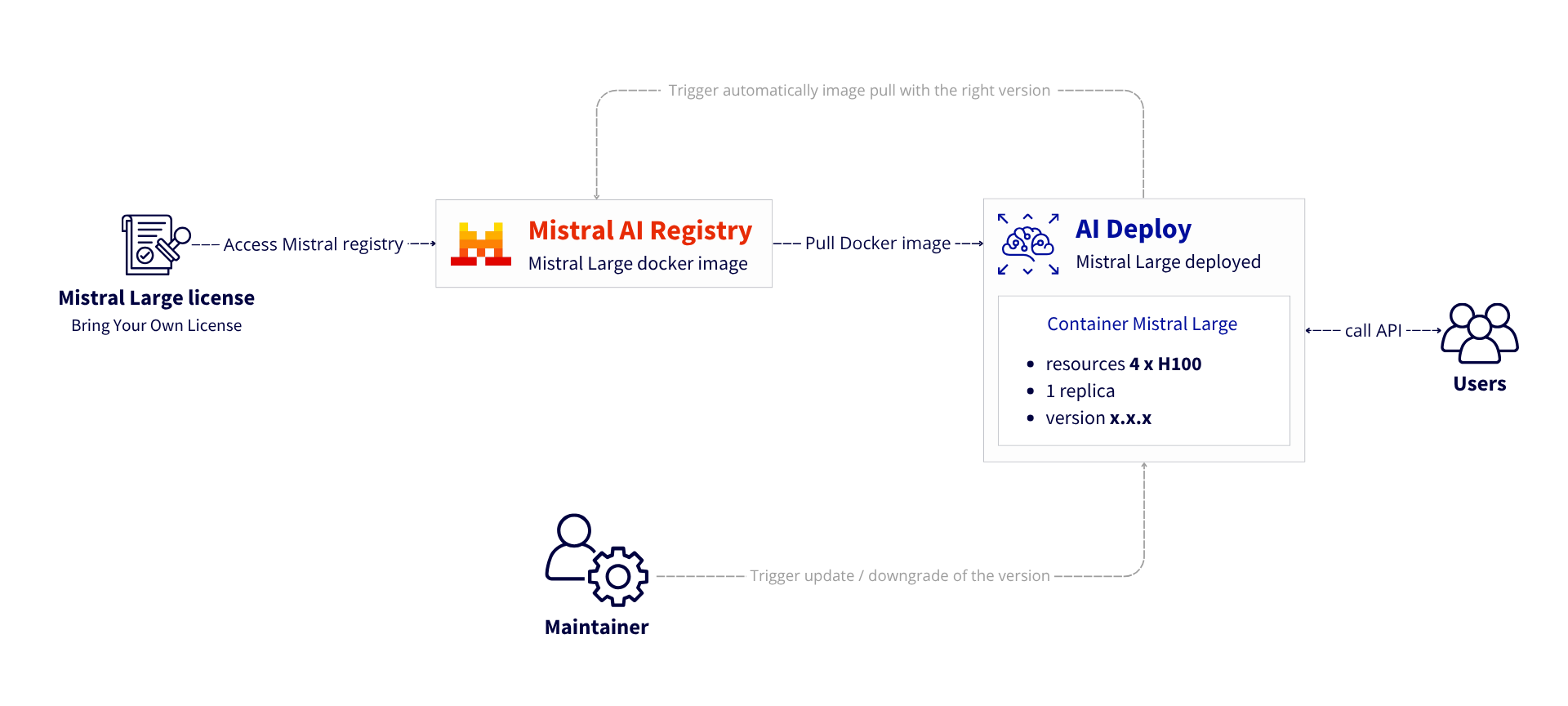
Are you ready to think bigger with the Mistral Large model 🚀 ?
As Artificial Intelligence (AI) becomes a strategic pillar for both enterprises and public institutions, data sovereignty and infrastructure control have become essential. Deploying advanced large language models (LLMs) like Mistral Large, under a commercial license, requires a secure, high-performance environment that complies with European data regulations.
OVHcloud Machine Learning Services offer a trusted solution for deploying AI models in a fully sovereign cloud environment — hosted in Europe, under EU jurisdiction, and fully GDPR-compliant.
This Reference Architecture will show you how to:
- Access Mistral AI registry using your own license
- Download the Mistral Large 123B model automatically using AI Training
- Store the model into a dedicated bucket with OVHcloud Object Storage
- Deploy a production-ready inference API for Mistral Large using AI Deploy
Context
Mistral Large model
The Mistral Large model is a state-of-the-art (LLM) developed by Mistral AI, a French AI company. It’s designed to compete with top-tier models like GPT-4, Claude, while emphasizing performance and efficiency.
This is a model with 123 billion parameters. Mistral AI recommends deploying this model in FP8 with 4 H100 GPUs. For more information, refer to Mistral documentation.
This model requires the use of a commercial licence. To do this, you need to create an account on La Plateforme via the Mistral AI console (console.mistral.ai).
AI Training
OVHcloud AI Training is a fully managed platform designed to help you train, tune Machine Learning (ML), Deep Learning (DL), and Large Language Models (LLMs) efficiently. Whether you’re working on computer vision, NLP, or tabular data, this solution lets you launch training jobs on high-performance GPUs in seconds.
What are the key benefits?
- Easy to use: launch processing or training jobs in one CLI command or a few clicks using your own Docker image
- High-performance computing: access GPUs like H100, A100, V100S, L40S, and L4 as of June 2025 – new references are added regularly
- Cost-efficient: pay-per-minute billing with no upfront commitment. You only pay for compute time used, with precise control over resources thanks to automatic job stop and synchronisation
💡 Why do we need AI Training? To download the Mistral Large model automatically and efficiently, using a single command to launch the job.
AI Deploy
OVHcloud AI Deploy is a Container as a Service (CaaS) platform designed to help you deploy, manage and scale AI models. It provides a solution that allows you to optimally deploy your applications / APIs based on Machine Learning (ML), Deep Learning (DL) or LLMs.
The key benefits are:
- Easy to use: bring your own custom Docker image and deploy it in a command line or a few clicks surely
- High-performance computing: a complete range of GPUs available (H100, A100, V100S, L40S and L4)
- Scalability and flexibility: supports automatic scaling, allowing your model to effectively handle fluctuating workloads
- Cost-efficient: billing per minute, no surcharges
✅ To go further, some prerequisites must be checked!
Overview of the Mistral Large deployment architecture
Here is how will be deployed Mistral Large 123B:
- Install the ovhai CLI
- Create a bucket for model storage
- Retrieve the license information from Mistral Console
- Configure and set up the environment
- Download the Mistral Large model weights
- Deploy the Mistral Large service
- Test it with simple request and advanced usage thanks to LangChain

Let’s go for the set up and deployment of your own Mistral Large service!
Prerequisites
Before you begin, ensure you have:
- A Mistral AI license to access to the Mistral Large model
- An OVHcloud Public Cloud account
- An OpenStack user with the following roles:
- Administrator
- AI Training Operator
- Object Storage Operator
🚀 Having all the ingredients for our recipe, it’s time to deploy the Mistral Large model on 4 H100!
Architecture guide: Mistral Large on OVHcloud infrastructure
Let’s go for the set up and deployment of the Mistral Large model!
✅ Note
In this example, theMistral Large 25.02 is used. Choose the mistral model under the licence of your choice and repeat the same steps, adapting the model name and versions.⚙️ Also consider that all of the following steps can be automated using OVHcloud APIs!
Step 1 – Install ovhai CLI
If the ovhai CLI is not install, start by setting up your CLI environment.
curl https://cli.gra.ai.cloud.ovh.net/install.sh | bashSecondly, login using your OpenStack credentials.
ovhai login -u <openstack-username> -p <openstack-password>Now, it’s time to create your bucket inside OVHcloud Object Storage!
Step 2 – Provision Object Storage
- Go to Public Cloud > Storage > Object Storage in the OVHcloud Control Panel.
- Create a datastore and a new S3 bucket (e.g.,
s3-mistral-large-model). - Register the datastore with the
ovhaiCLI:
ovhai datastore add s3 <ALIAS> https://s3.gra.perf.cloud.ovh.net/ gra <my-access-key> <my-secret-key> --store-credentials-locally💡 Note that, for this use case, we recommend the High Performance Object Storage range using https://s3.gra.perf.cloud.ovh.net/ instead of https://s3.gra.io.cloud.ovh.net/
Step 3 – Access the Mistral AI registry
⚠️ Please note that you must have a licence for the Mistral Large model to be able to carry out the following steps.
- Go to the Mistral AI platform: https://console.mistral.ai/home
- Retrieve credentials and the license key from the Mistral console: https://console.mistral.ai/on-premise/licenses
- Authenticate to the Mistral AI Docker registry:
docker login <mistral-ai-registry> --username $DOCKER_USERNAME --password $DOCKER_PASSWORDAdd the private registry to the config using the ovhai CLI:
ovhai registry add <mistral-ai-registry>Check that it is present in the list:
ovhai registry listStep 4 – Define environment variables
The next step is to define an .env file that will list all the environment variables required to download and deploy the Mistral Large model.
- Create the
.envfile, enter the following information:
SERVED_MODEL=mistral-large-2502
RECIPES_VERSION=v0.0.76TP_SIZE=4
LICENSE_KEY=<your-mistral-license-key>
DOCKER_IMAGE_INFERENCE_ENGINE=<mistral-inference-server-docker-image>
DOCKER_IMAGE_MISTRAL_UTILS=<mistral-utils-docker-image>
Then, create a script to load theses environment variables easily. Name it load_env.sh:
#!/bin/bash

# Vérifie si le fichier .env existe
if [ ! -f .env ]; then
  echo "Error: .env not found"
  exit 1
fi

# Exporter toutes les variables du .env
export $(grep -v '^#' .env | xargs)

echo "Environment variables are loaded from .env"
Now, launch this script :
source load_env.sh✅ You have everything you need to start the implementation!
Step 5 – Download Mistral Large model weights
The aim here is to download the model and its artefacts into the S3 bucket created earlier.
To achieve this, you can launch a download job that will run automatically with AI Training.
💡 Here’s a tip!
Note that here you are not using AI Training to train models, but as an easy-to-use Container as a Service solution. With a single command line, you can launch a one-shot download of the Mistral Large model with automatic synchronisation to Object Storage.- Launch the AI Training download job by attaching the object container:
ovhai job run --name DOWNLOAD_MISTRAL_LARGE_123B \
              --cpu 12 \
              --volume s3-mistral-large-model@<ALIAS>/:/opt/ml/model:RW \
              -e RECIPES_VERSION=$RECIPES_VERSION \
              $DOCKER_IMAGE_MISTRAL_UTILS \
                -- bash -c "cd /app/mistral-rclone && \
                  poetry run python mistral-rclone.py \
                  --license-key $LICENSE_KEY \
                  --download-model $SERVED_MODEL"
Full command explained:
ovhai job run
This is the core command to run a job using the OVHcloud AI Training platform.
--name DOWNLOAD_MISTRAL_LARGE_123B
Sets a custom name for the job. For example, DOWNLOAD_MISTRAL_LARGE_123B.
--cpu 12
Allocates 12 CPU for the job.
--volume s3-mistral-large-model@<ALIAS>/:/opt/ml/model:RW
This mounts your OVHcloud Object Storage volume into the job’s file system:
– s3-mistral-large-model@<ALIAS>/: refers to your S3 bucket volume from the OVHcloud Object Storage
– :/opt/ml/model: mounts the volume into the container under /opt/ml/model
– RW: enables Read/Write permissions
-e RECIPES_VERSION=$RECIPES_VERSION
This is from your environment variables defined previously.
$DOCKER_IMAGE_MISTRAL_UTILS
This is the Mistral Large utils Docker image you are running inside the job.
-- bash -c "cd /app/mistral-rclone && \poetry run python mistral-rclone.py \--license-key $LICENSE_KEY \--download-model $SERVED_MODEL"
Refers to the specific command to launch the model download.
Note that synchronisation with Object Storage will be automatic at the end of the AI Training job.
⚠️ WARNING!
Wait for the job to go toDONE before proceeding to the next step.- Check that the various elements are present in the bucket:
ovhai bucket object list s3-mistral-large-model@<ALIAS>he bucket must be organized and split into 4 different folders:
- grammars
- recipes
- tokenizers
- weights
Note that a total of 6 elements must be present.
🚀 It’s all there? So let’s move on to the deployment of the Mistral Large model!
Step 6 – Deploy Mistral Large service
To deploy the Mistral Large 123B model using the previously downloaded weights, you will use OVHcloud’s AI Deploy product.
But first you need to create an API key that will allow you to consume the model and query it, in particular using Open AI compatibility.
- Creation of an access token:
ovhai token create --role read mistral_large=api_key_readerExport this token as an environment variable:
export MY_OVHAI_MISTRAL_LARGE_TOKEN=<your_ovh_access_token_value>Launch the Mistral Large service with AI Deploy by running the following command:
ovhai app run --name DEPLOY_MISTRAL_LARGE_123B \
              --gpu 4 \
              --flavor h100-1-gpu \
              --default-http-port 5000 \
              --label mistral_large=api_key_reader \
              -e SERVED_MODEL=$SERVED_MODEL \
              -e RECIPES_VERSION=$RECIPES_VERSION \
              -e TP_SIZE=$TP_SIZE \
              --volume s3-mistral-large-model@<ALIAS>/:/opt/ml/model:RW \
              --volume standalone:/tmp:RW \
              --volume standalone:/workspace:RW \
              $DOCKER_IMAGE_INFERENCE_ENGINE
Full command explained:
ovhai app run
This is the core command to run an app / API using the OVHcloud AI Deploy platform.
--name DEPLOY_MISTRAL_LARGE_123B
Sets a custom name for the app. For example, DEPLOY_MISTRAL_LARGE_123B.
--default-http-port 5000
Exposes port 5000 as the default HTTP endpoint.
--gpu4
Allocates 4 GPUs for the app.
--flavor h100-1-gpu
Chooses H100 GPUs for the app.
--volume s3-mistral-large-model@<ALIAS>/:/opt/ml/model:RW
This mounts your OVHcloud Object Storage volume into the job’s file system:
– s3-mistral-large-model@<ALIAS>/: refers to your S3 bucket volume from the OVHcloud Object Storage
– :/opt/ml/model: mounts the volume into the container under /opt/ml/model
– RW: enables Read/Write permissions
--label mistral_large=api_key_reader
Means that the access is restricted to your token
-e SERVED_MODEL=$SERVED_MODEL-e RECIPES_VERSION=$RECIPES_VERSION-e TP_SIZE=$TP_SIZE
These are environment variables defined previously.
-v standalone:/tmp:rw-v standalone:/workspace:rw
Mounts two persistent storage volumes:
– /tmp
– /workspace → Main working directory
$DOCKER_IMAGE_INFERENCE_ENGINE
This is the Mistral Large inference Docker image you are running inside the app.
It may take a few minutes for the resources to be allocated and for the Docker image to be pulled.
To check the progress and get additional information about the AI deploy app, run the following command:
ovhai app get <ai_deploy_mistral_app_id>Once in RUNNING status, the model will be loaded. To check that the load was successful, you can check the container logs:
ovhai app logs <ai_deploy_mistral_app_id>⚠️ WARNING!
To consume the service, you must wait for the app to go intoRUNNING status, AND for the model to finish loading.🎉 Is that it? Everything ready? It is therefore possible to start playing with the model!
Step 7 – Test the Mistral Large model by sending your first requests
- Access the API doc via your app URL:
https://<ai_deploy_mistral_app_id>.app.gra.ai.cloud.ovh.net/docs
To find the information, please refer to https://console.mistral.ai/on-premise/licenses
- Test with a basic cURL:
curl -X 'POST' \
'https://<ai_deploy_mistral_app_id>.app.gra.ai.cloud.ovh.net/v1/chat/completions' \
  -H 'accept: application/json' \
  -H "Authorization: Bearer $MY_OVHAI_MISTRAL_LARGE_TOKEN" \
  -H 'Content-Type: application/json' \
  -d '{
  "model": "mistral-large-<version>",
  "messages": [
    {
      "role": "system",
      "content": "You are a helpful assistant!"
    },
    {
      "role": "user",
      "content": "What is the capital of France?"
    }
  ]
}'
⚠️ Note that you have also to replace <version> in the model name by the one you are using:"model": "mistral-large-<version>"
To take implementation a step further and take advantage of all the features of this endpoint, you can also integrate it with Langchain thanks to its fuOpenAI compatibility.
- LangChain integration:
import time
import os
from langchain.chat_models import ChatOpenAI
from langchain_core.prompts import ChatPromptTemplate

def chat_completion_basic(new_message: str):

  model = ChatOpenAI(model_name="mistral-large-<version>",
                        openai_api_key=$MY_OVHAI_MISTRAL_LARGE_TOKEN,
                        openai_api_base='https://<ai_deploy_mistral_app_id>.app.gra.ai.cloud.ovh.net/v1',
                       )

  prompt = ChatPromptTemplate.from_messages([
    ("system", "You are a helpful assistant!"),
    ("human", "{question}"),
  ])

  chain = prompt | model

  print("🤖: ")
  for r in chain.stream({"question", new_message}):
    print(r.content, end="", flush=True)
    time.sleep(0.150)

chat_completion_basic("What is the capital of France?)
🥹 Congratulations! You have successfully completed the deployment!
Conclusion
You can now consume your Mistral Large 123B in a secure environment!
The result of your implementation? The deployment of a sovereign, scalable, production-quality 123B LLM, powered by OVHcloud AI Deploy.
➡️ To go further?
- Update your model in a single command line and without interruption following this documentation
- Go to the next replica in the event of a heavy load to ensure high availability using this method